

Reflective Objects is included in the World Publisher Suite Pro . Find out more
What’s A Reflective Object?
The need for reflective objects might not be apparent at first, but we are confident that once you start using them, you will not know how you worked without them!
Simply put: a reflective object is any page item which keeps its page position relative to the spine (whether it’s a text frame, graphic, etc.). Even guides can be set as reflective, so you don’t need to create separate masters just because you need a different set of guides in part of your document.
But Who Needs Them?
When laying out documents with facing pages, design elements which have a distinct position relative to the spine are usually present. While in many situations, creating design elements on master pages is ideal, often it is not. A primary example is master text frames.
The problem with these elements become apparent when pages are added or removed. Very often a recto page becomes a verso page or vice versa. This causes the layout to become reversed. Correcting these pages can be an extremely time consuming process! Defining these objects as “reflective” causes them to take a mirrored position when the page changes sides.
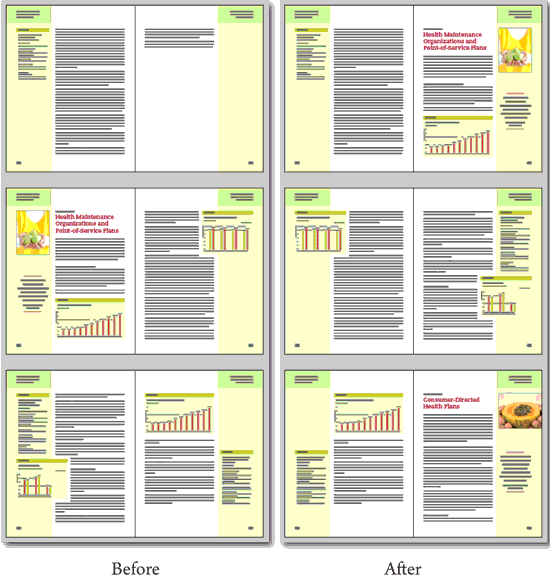
To illustrate this point, we are including two screen shots of a document which uses Reflective Objects for positioning graphic elements in the side bar area. In this document, these elements couldn’t be created as anchored objects because of the text wrap applied to many of them. When the top right page was removed from the figure on the left, the layout on all the following pages was automatically adjusted as shown in the figure on the right. A special thank you to Brad Walrod for providing these illustrations.
Another use for reflective objects is simplifying symmetrical design. Design elements which appear in symmetrical positions on both recto and verso pages only need to be created once. After creating them on one side, they can be copied to the facing page en mass, and each object will take an opposing position to its original!

I have downloaded the trial version of this product and am using it with InDesign CS6 (Mac). I’m working on a long document (already completely laid out) and have gone through about 80 pages of it turning on the “Reflect position” setting for all the objects on a spread, using the control-click contextual menu method. I went back to check a couple of pages to make sure I had it on. I saw that it had “Remove reflective setting” checked, which all of them do before I select “Reflect position.” At first, I thought I had just missed the objects on that particular spread, but then even after selecting “Reflect position” again and rechecking, the “Remove reflective setting” selection remains checked. Objects on other spreads behave the same way. At this point, I decided to check the InTools menu with the same objects selected, and it does show that the “Reflect Position” option is checked as well as grayed out. So it appears that the setting has been applied, but it sure would be nice if I could tell that by control-clicking, which is much faster than going to a menu and another submenu. Is this a known issue? Would really like to know before purchasing the license.
Before selecting a setting, the first item is called “No Settings Set” and should be checked. If an item has a setting, the item should be called “Remove Reflective Setting” and should not be checked. I’m not aware of a situation where Remove Reflective Setting would be checked.
If possible, you might want to do some testing with your plugin using CS6 on a Mac. Depending on whether I have one or multiple objects selected, or whether or not I have already chosen “Reflect position,” I then see checks/grayed items that are not what they ought to be, and do not match as far as whether “Reflective Objects” is chosen from the InTools menu or by control-clicking. I can only describe the behavior as buggy.